

Title: ReKrute launches its new App: your recruiter space now at your fingertips

An innovation that simplifies the management of your recruitments
ReKrute continues its commitment to the digitalization of recruitment with the launch of its Progressive Web App (PWA), a fast, fluid mobile application accessible without downloading from the Apple or Google stores.
Designed for you, recruiters and HR partners, this evolution now allows you to access your recruiter space at any time, wherever you are. You can view your job postings, track applications received, and manage your recruitment campaigns from your phone, with complete ease.
An even more accessible recruiter space
Thanks to this new App, managing your recruitments becomes smoother and more intuitive:
Access your recruiter space in one click, without going through an app store;
Easily find your published job postings and track their performance in real time;
View applications received, see profiles, and manage your shortlists directly from your mobile;
Enjoy an ergonomic interface, designed for quick and comfortable use;
Stay connected to your activity with automatic updates and ultra-fast navigation, even with limited connectivity.
With this new experience, ReKrute brings you reactivity, efficiency, and ease of use.
A tool designed for HR performance
The Progressive Web App combines the advantages of a mobile application with the lightness of a website. It requires no installation, updates automatically, and uses very little storage space.
Available on Android and iPhone, it allows you to stay connected to your recruitments at all times: no need to wait until you are at the office to view your applications or post a job.
ReKrute, always closer to recruiters
With this innovation, ReKrute reaffirms its ambition: simplify your HR daily life and allow you to manage your recruitments with complete flexibility.
The new ReKrute App offers a direct connection between you and your candidates, instant access to your tools, and a modern experience adapted to your needs.
Available on Android and iPhone, it allows you to stay connected to your recruitments at all times: no need to wait until you are at the office to view your applications or post a job.
On Android:
Open www.rekrute.com in Google Chrome.
A banner will appear at the bottom of the screen: click on “Add to Home Screen”.
The ReKrute icon will then appear like a classic application on your phone.
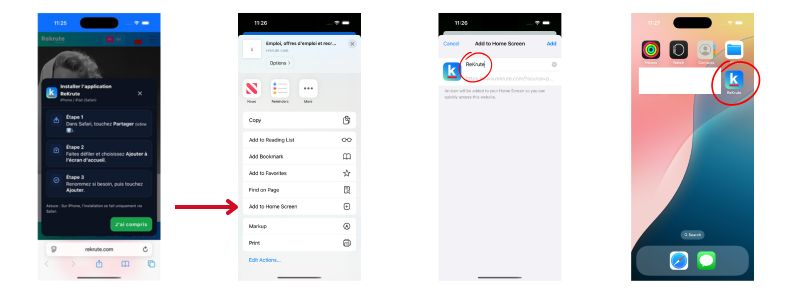
On iPhone:
Installation is slightly different:
Open Safari and go to www.rekrute.com.
Tap the “Share” icon (rectangle with an upward arrow) at the bottom of the screen.
Select “Add to Home Screen”.
ReKrute will now appear alongside your other applications.
Try the new ReKrute App now:
Read also: Central Test: the predictive solution for recruitment, training, and career management
